Doba Pilot User Guide

Meet Doba Pilot, your AI dropshipping assistant

Doba Pilot is the AI agent built on Doba's 20+ years of dropshipping expertise.

Powered by Doba's trusted U.S. supplier network, proven industry knowledge, and AI-driven execution, Pilot helps you turn ideas into action—from market research and product sourcing to store setup, listing, and workflow automation. Just tell Pilot what you want, and it takes care of the rest.

From Market Research to Product Listing—One Connected AI Workflow

Market ScoutAI Product SourcingAI Store BuilderAI ListingFulfillment
01
Market Scout
Research the market
02
AI Product Sourcing
Find products
03
AI Store Builder
Launch your store.
04
AI Listing
Publish products
05
Fulfillment
Coming Soon
Fulfill orders automatically
Supported throughout the workflow
AI SupportScheduled TasksLibraryLong-Term Memory

Get Started

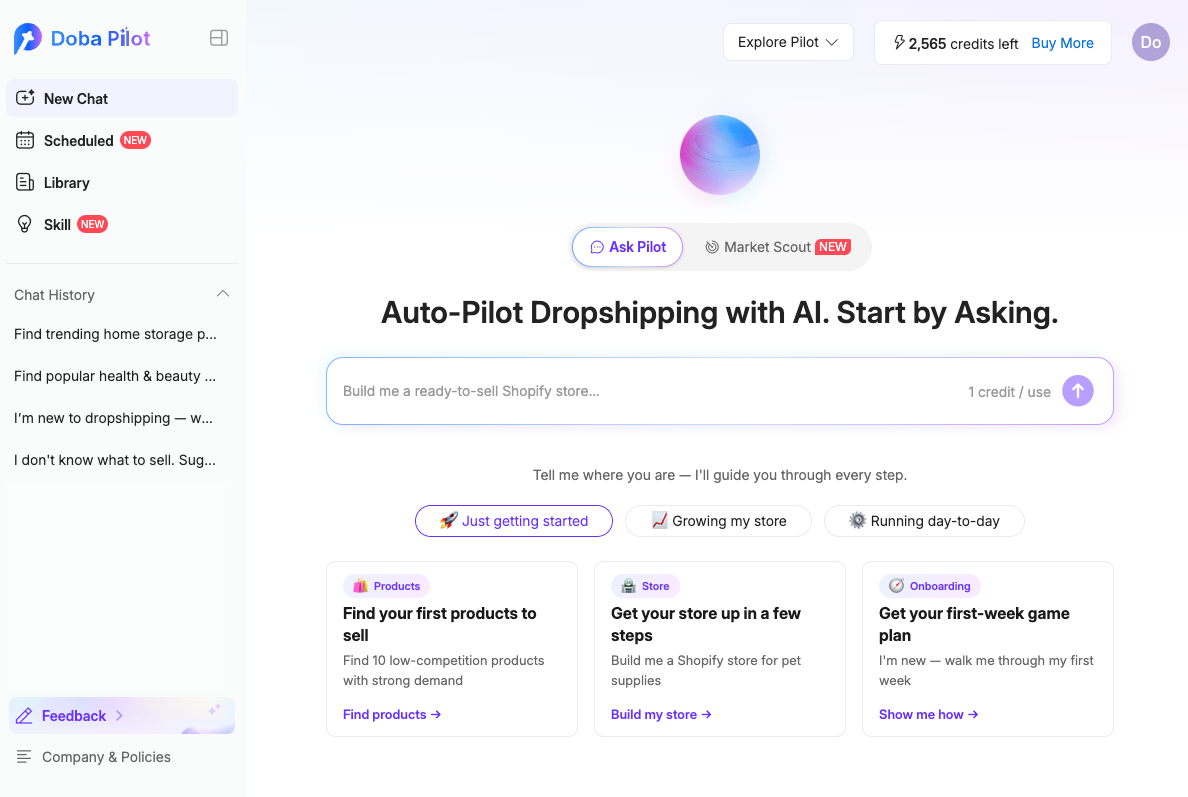
You do not need to learn a complicated dashboard before using Doba Pilot. Open New Chat, tell Pilot what you want to accomplish, and follow the guided steps to set up a store, find products, and create listings. You can also start with Market Scout when you want to research a market before choosing products.

Doba Pilot home screen
  1. Open New Chat. Describe your goal in everyday language, including the niche or product category you want to sell. To research the market first, open Market Scout and generate a full market analysis.
  2. Follow the AI-guided workflow. Within the same conversation, Pilot can guide you through setting up or connecting a store, finding suitable products, and listing selected products to a connected store.
  3. Not sure what to ask? Select one of the suggested prompts on the page to begin. You can then ask follow-up questions to narrow the results until they better match your needs.
Try this prompt

What Doba Pilot Helps You Do

1Store ManagementSet up, connect, and manage each platform

AI Store Setup & Connection

Set up · Connect · List · Sync · Fulfill

Doba Pilot includes an AI Store Builder for Shopify. For other supported platforms, Pilot provides guided store setup or connection steps. After connecting a store, you can list products, sync inventory and pricing, and manage fulfillment workflows.

ShopifyBigCommerceWixeBay · SoonWalmart · SoonTikTok Shop · SoonAmazon · SoonTemu · Soon
2Product Research and Market InsightsFind products and read the market

AI Product Sourcing

Search · Discover · Compare · Select

Search Doba's catalog based on your product category, target market, shipping preferences, inventory needs, and supplier requirements. Compare matched products and supplier performance before choosing what to list.

Market Scout

Trends · Competition · Pricing · Seasonality

Analyze demand, competition, pricing, seasonality, and product trends in a structured market report. You can then search Doba for products similar to the opportunities identified in the report.

3Listings and MarketingPublish and promote your products

AI Listing

Generate · Preview · Publish

Generate or improve product titles and descriptions, configure pricing rules, preview the results, and publish selected products to a connected store.

Soon

Marketing Asset Generation

Generate and refine advertising creative, promotional copy, and landing page assets for your products and store.

Soon

SEO and GEO Optimization

Optimize product listings and content for traditional search engines and AI-generated answers.

4Store OperationsAutomate routine work and optimize

AI Support

Product use · Accounts · Policies

Get answers to common questions about Doba features, workflows, and policies using Doba's knowledge base.

Scheduled Tasks

Monitoring · Reports · Automated Listings

Schedule recurring product research, market reports, and product listing tasks. Review each run in Scheduled Tasks or return to the related conversation in Chat History.

Soon

Fulfillment

Manage fulfillment for connected stores in one place.

Soon

Alerts

Receive notifications about price changes, low inventory, and rising trends before they create avoidable losses or missed opportunities.

Soon

Store Performance Analysis

Turn store GMV, order volume, and average order value into clear operational insights.

How to Use Doba Pilot by Workflow

Launch My First Store

Best for beginners who want one guided path from store setup to their first product listings.

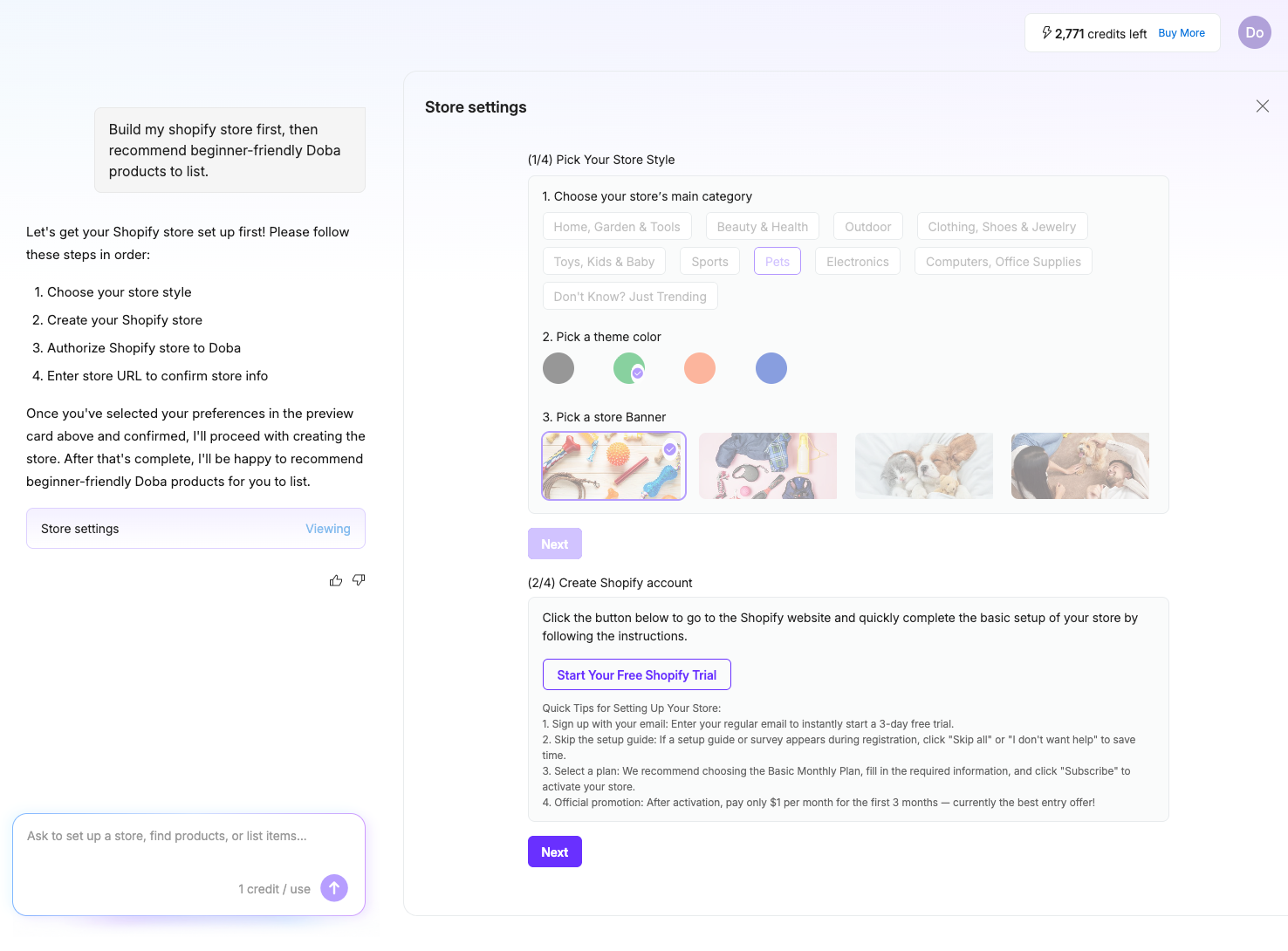
Shopify store setup workflow in Doba Pilot
  1. Open New Chat from the left navigation and describe what you want to do in everyday language. For example:
    Build my Shopify store first, then recommend beginner-friendly Doba products to list.
  2. After you send the request, Doba Pilot opens the store setup workflow and displays guided steps in the workspace.
  3. Once the store setup is complete, Pilot guides you through AI product sourcing so you can review and select suitable products.
  4. Select the products you want to list, then choose List Selected Products Now to continue directly to the listing workflow.
Research a Market Opportunity

Use Market Scout when you want to understand trends, competition, demand, pricing, or seasonality before deciding what to sell.

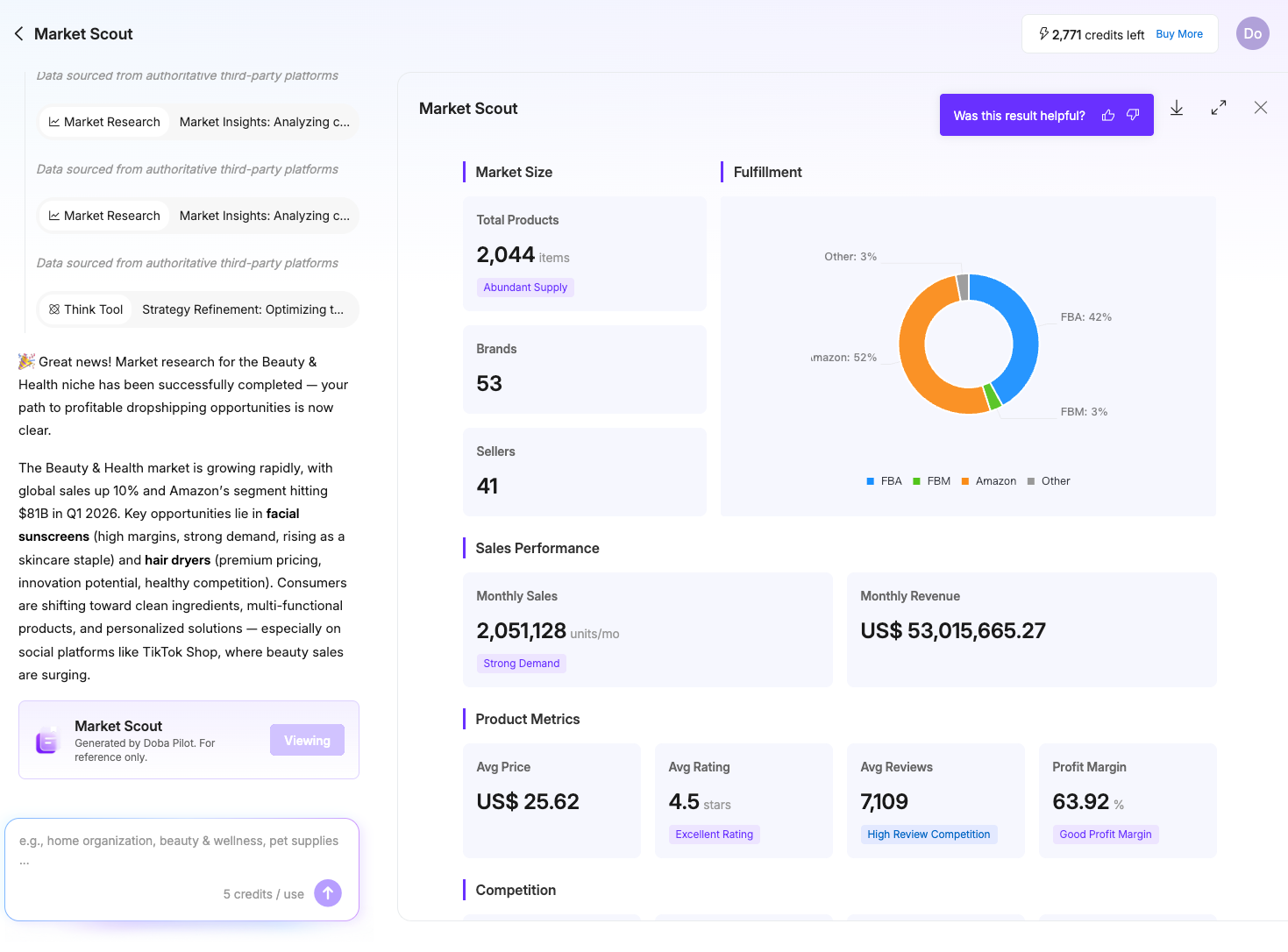
Market Scout market research report
  1. Select the Market Scout menu on the New Chat page.
  2. Enter the market or category you want to research, such as:
    Beauty & Health
  3. Doba Pilot begins the market research process. The conversation area displays Thinking Steps while the analysis is in progress.
  4. When the research is complete, Market Scout generates a structured report covering market size, trends, popular products, customer demand, and other relevant signals.
  5. The report may include popular products from marketplaces such as Amazon. Select Find Doba Similar next to a product to search for similar products available through Doba.
  6. When you do not have a specific market in mind, select one of the suggested prompts below the input area to generate a beginner-friendly market report.
Try this prompt
Find Products to Sell

Use AI Product Sourcing to find products that match your niche, target market, inventory needs, shipping preferences, or supplier requirements.

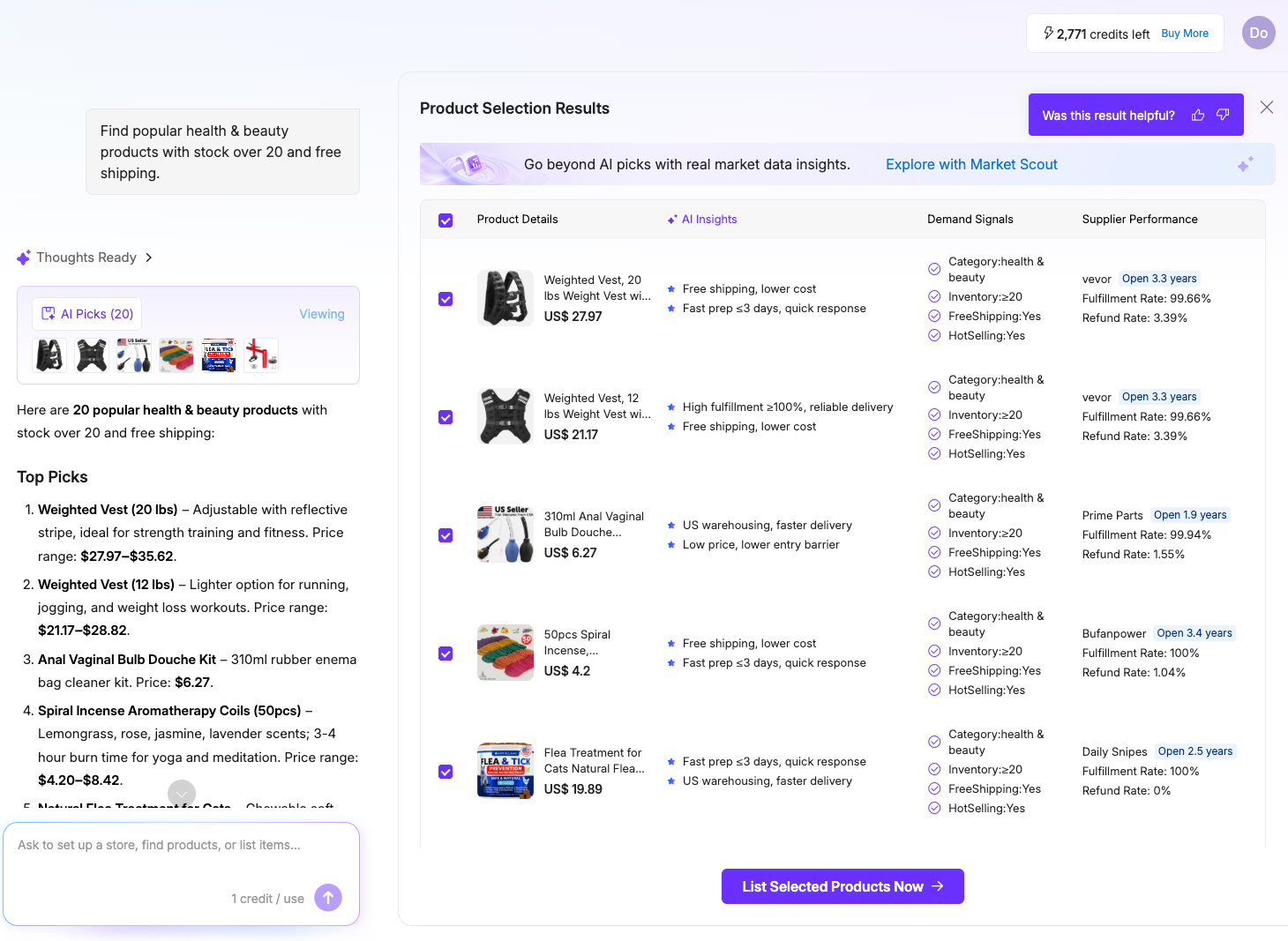
AI product sourcing results in Doba Pilot
  1. Open New Chat and describe the products you want to find. For example:
    Help me find pet products to sell in the U.S.
  2. Doba Pilot begins the product sourcing workflow. The conversation area displays Thinking Steps so you can see how the AI is filtering and matching products.
  3. The results area displays 20 products that match the request. Review the products using four decision-making dimensions:
    Product Details
    AI Insights
    Demand Signals
    Supplier Performance
  4. Select the products you want, then choose List Selected Products Now to continue directly to the listing workflow.
Try this prompt
Set Up or Connect My Store

Best for sellers who only need to create a Shopify store or connect an existing supported store before using other Pilot workflows.

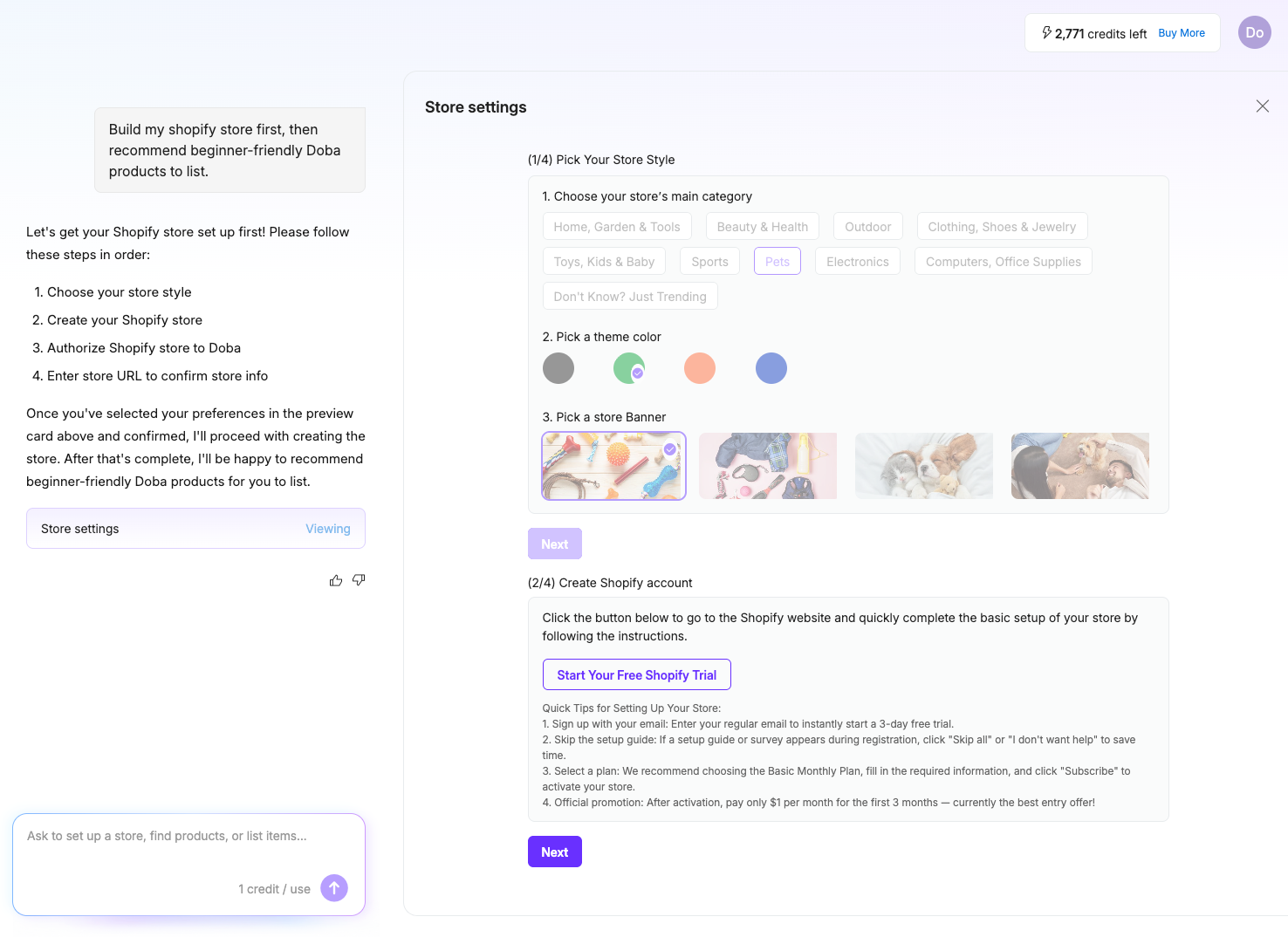
Doba Pilot store settings
  1. Create a Shopify store. Open New Chat and enter a request such as:
    Help me create a Shopify store.
    Follow the guided steps to choose your store preferences and complete the setup.
  2. Connect or authorize an existing store. On the Doba Pilot home page, select the Store tab, then choose Connect store to Doba. Follow the step-by-step authorization instructions to complete the connection.
Try this prompt
List Products to My Store

After selecting products, use Doba Pilot to configure pricing, optimize product content, and publish products to your connected store.

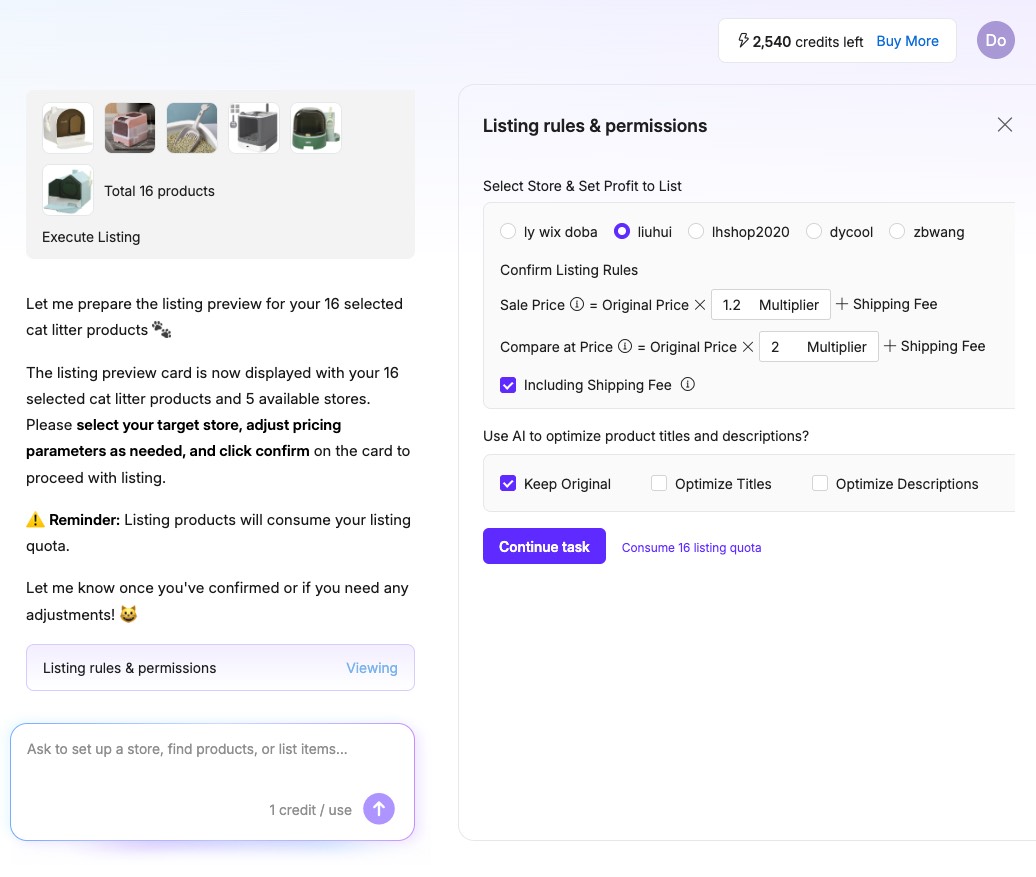
Product listing rules and permissions
  1. In the product results view, select the products you want to list and choose List Selected Products Now.
  2. Configure the listing settings based on your needs:
    Sale price multiplier and compare-at price — Set the sale price as a multiple of the original cost and configure a compare-at price when appropriate.
    AI-optimized titles and descriptions — Let AI generate or improve product titles and descriptions to highlight the product's key selling points.
    Pricing that includes shipping — Include shipping costs when calculating the final selling price to reduce the risk of underpricing.
  3. Confirm the settings to sync the products to your Shopify store. You can review listing and sync status in My AI Listings.
Automate My Weekly Tasks

Use Scheduled Tasks when you want Doba Pilot to repeat a workflow automatically, such as adding new products to your store each week.

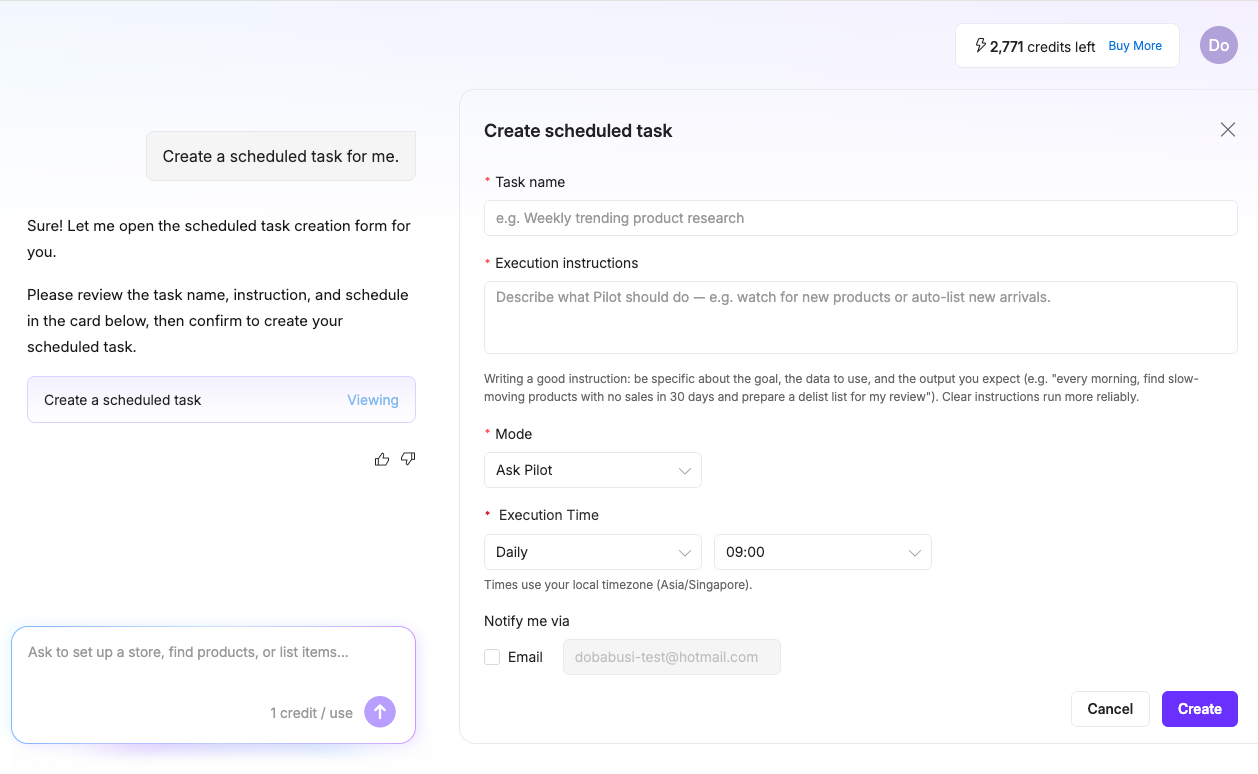
Create a scheduled task in Doba Pilot
  1. Open New Chat and enter a request such as:
    Help me create a scheduled task.
    Doba Pilot will open the scheduled task setup workflow.
  2. You can also open the Scheduled section and select Create. Choose a suitable template, update the task name, instructions, mode, execution time, and notification settings, then submit the task.
  3. Open the task details to review successful or failed runs. You can also find scheduled-task conversations in Chat History, where they are marked with a scheduled-task icon.
Get Help with Doba and Pilot

Use Doba Pilot as an AI support assistant when you have questions about Doba features, workflows, policies, or platform use.

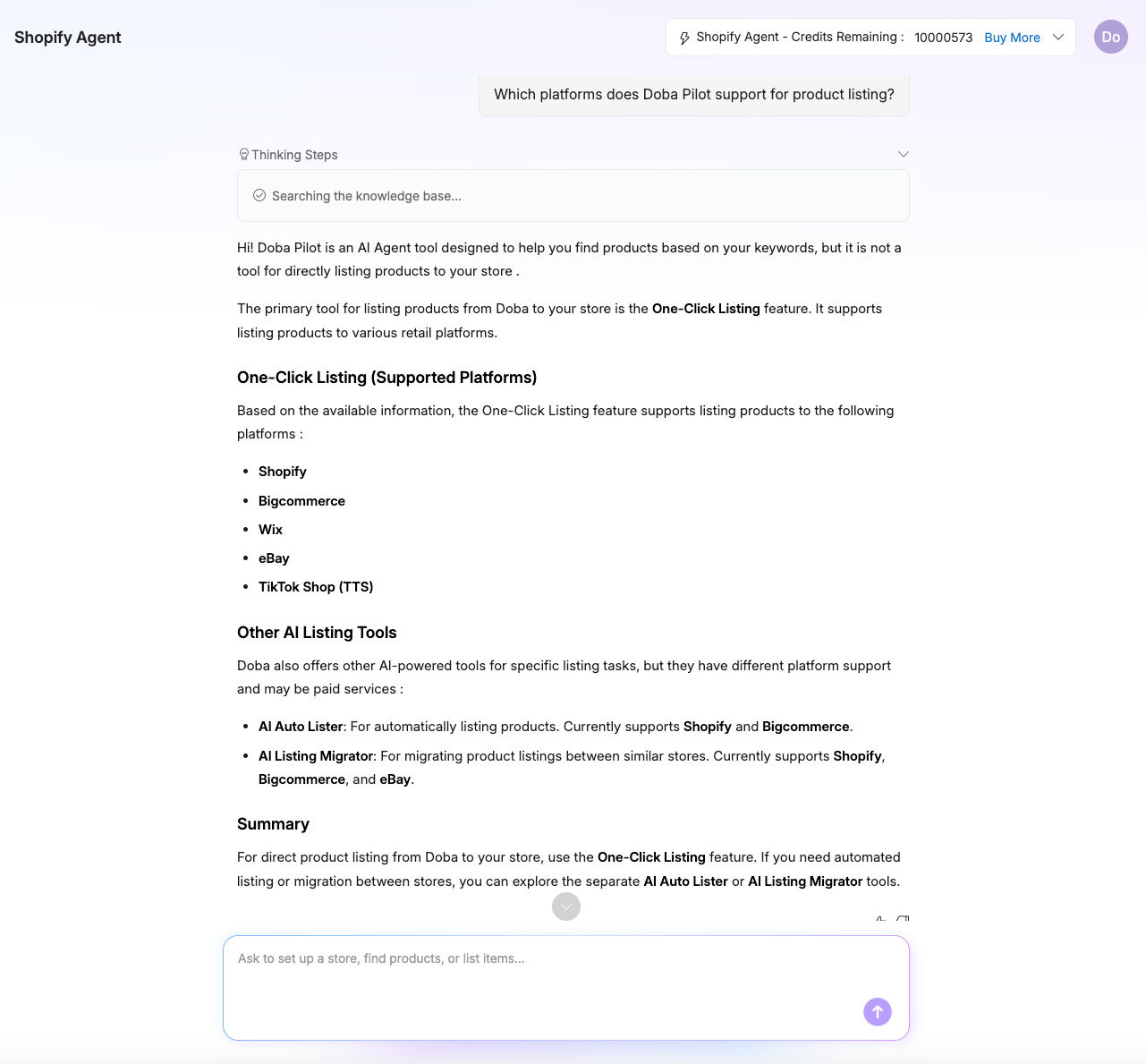
Doba Pilot knowledge base answer
  1. Enter your question directly in New Chat. For example:
    Which platforms does Doba Pilot support for product listing?
  2. When you are unsure what to ask, select the Support tab on the home page and choose one of the suggested questions.
  3. Doba Pilot searches the knowledge base and provides an answer covering relevant Doba and Doba Pilot features, policies, and operating instructions.
Try this prompt

Popular Prompts

A simple prompt formula: Goal  +  product category or niche  +  target market  +  business requirement  +  next action.

Market Scout Prompts

Market analysis
Compare two niches

AI Product Sourcing Prompts

Beginner-friendly pet products
High-margin home decor

Store Setup Prompts

Connect a store
Create a Shopify store
Next steps after authorization

Product Listing Prompts

List & optimize products

Scheduled Task Prompts

Weekly product listings

Credits

Credit Usage

  • Ask Pilot: 1 credit per use
  • Market Scout: 5 credits per use
  • Product listing tasks: Use both Doba Pilot credits and the listing quota included with your Doba plan

You can check your remaining credits in the Credits area in the top navigation. Select Buy More when you need additional credits. Add-on credit packs are valid for one month.

Frequently Asked Questions

QWhat is Doba Pilot?

Doba Pilot is an AI dropshipping assistant built for Doba users. It helps sellers research markets, find products, connect stores, create product listings, schedule recurring AI tasks, and get guidance through natural-language conversations.

QWhat can Doba Pilot help me do?

Doba Pilot helps sellers research markets, find products in Doba's catalog, set up or connect stores, create product listings, schedule recurring tasks, and get answers about Doba features and policies.

QHow is Doba Pilot different from a general AI chatbot?

Doba Pilot is built for dropshipping workflows and works with Doba's product catalog, supplier information, store connections, and platform knowledge. It can help users move from research and product sourcing to store setup and product listing, rather than only providing general advice.

QHow does AI Product Sourcing work?

AI Sourcing finds products in Doba's catalog based on your request. It reviews factors such as product fit, supplier performance, and market potential, then returns a focused set of recommendations rather than the longest possible list. Ask a follow-up question to refine the results or request more matching options.

QWhat is Market Scout?

Market Scout is the market research feature in Doba Pilot. It helps sellers evaluate market opportunities, demand signals, competition, trends, pricing, and related product ideas before deciding what to sell.

QCan Doba Pilot create and publish product listings?

Yes. Doba Pilot can prepare product listings and publish them to a connected store. It currently supports Shopify, BigCommerce, and Wix, with more platforms coming soon. Building a store, connecting a store, and listing require the $0.99 7-day trial plan.

QWhat are Scheduled Tasks?

Scheduled Tasks let Doba Pilot run recurring AI tasks automatically, such as checking supplier or category new arrivals, generating market reports, or running an auto-listing pipeline. You can choose to be notified for review, or let Doba Pilot execute the task automatically.

QWhat are Skills and Library?

Skills shows the tasks Doba Pilot can perform and helps you start the right workflow. Library stores product research results, listing records, and market reports so you can review, continue, or reuse previous work.

QWhich ecommerce platforms does Doba Pilot support?

Doba Pilot currently supports store connection and product listing workflows for Shopify, BigCommerce, and Wix. Support for eBay, Walmart, TikTok Shop, Amazon, and Temu is coming soon. Available features may vary by platform and account status.ShopifyBigCommerceWixeBaySoonWalmartSoonTikTok ShopSoonAmazonSoonTemuSoon

QWho should use Doba Pilot?

Doba Pilot is designed for ecommerce and dropshipping sellers, especially beginners, sellers with limited product research or operating experience, and experienced sellers who want to reduce manual work and improve efficiency.

QDoes Doba Pilot guarantee sales?

No. Doba Pilot provides AI-assisted guidance, market signals, product recommendations, and listing support, but it does not guarantee sales. Before making a business decision, review demand, pricing, shipping, supplier performance, and how well the product fits your store.

QWhere can I get help with store connection or product listing issues?

Ask Doba Pilot for common troubleshooting steps, or contact Doba Support when the issue involves account access, authorization, billing, or a complex order case.

Still need help?

Can't find your answer, or hit a store authorization or listing issue? Contact Doba Support and we'll follow up.

Contact us